
Surprising fact: most travel adapters do not change electricity from one voltage to another. They only make your plug fit the wall. That distinction matters when you land in Bangkok, plug in a hair dryer, and hear a sharp pop instead of the soft sound of a charging phone. The safest buying process takes five minutes: identify the outlet type, check your device voltage, add up your charging wattage, then choose the smallest adapter that covers the trip.
Check the destination outlet before buying an adapter
Start with the wall socket, not the product box. The word universal often describes a sliding plug mechanism, not guaranteed compatibility with every socket on earth. Your destination determines the physical connector you need, while your device label determines the electrical safety question.
Match the plug type to your route
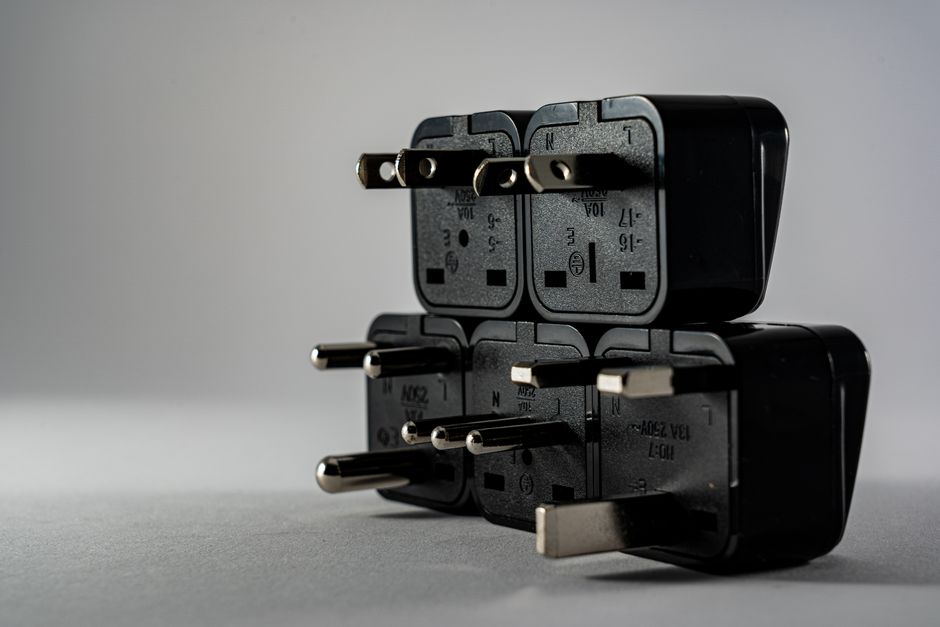
Type A and Type B sockets are common in the United States, Canada, Mexico, Japan, and parts of Central America. Type C and the related E and F sockets cover much of continental Europe, including France, Germany, Italy, Spain, and Greece. Type G is used in the United Kingdom, Ireland, Singapore, and Malaysia. Australia, New Zealand, Argentina, and China commonly use Type I, although socket designs can vary.
Countries can also use more than one format. Brazil, for example, has Type N sockets but many older buildings still accept Type C plugs. South Africa uses Type D, M, and newer Type N outlets. Check the exact country and hotel information before departure. A two-country trip may need two plug heads, even if one compact adapter claims worldwide coverage.
Separate plug shape from voltage
Look at the tiny print on every device that uses an AC outlet. A label reading 100–240V, 50/60Hz means the device can normally handle international voltage with only a plug adapter. Phone chargers, camera chargers, laptop chargers, and many electric toothbrush chargers fall into this group.
A device marked only 120V or only 230V needs a voltage converter or a dual-voltage replacement. Travel adapters do not make a single-voltage hair dryer safe. For high-heat appliances, the better verdict is to leave the device at home and buy a dual-voltage model with a switch. That option weighs less than a bulky converter and creates fewer overheating risks in a hotel bathroom.
Choose USB-C PD wattage from your device labels
USB-C describes the connector; PD describes the charging conversation. Power Delivery lets a charger and device agree on a suitable voltage and current. A 20W phone may draw 20W, while a 65W laptop can request much more. The charger does not force its maximum wattage into a smaller device, but the adapter must have enough capacity to meet the device’s demand.
Use this three-step wattage check
- Read the original charger. Find the output line, such as 5V/3A, 9V/3A, or 20V/3.25A.
- Convert volts multiplied by amps into watts. For example, 20V multiplied by 3.25A equals 65W.
- Add a margin when charging several devices. A 65W charger may handle a laptop and phone, but it will divide its power when both ports run at once.
For a phone, 20W to 30W is enough for fast charging on most trips. A tablet usually benefits from 30W to 45W. A MacBook Air, Dell XPS 13, or similar small laptop is best paired with 65W. Larger laptops may need 90W or 100W, especially during video editing or gaming.
Understand shared-port output
The number printed on the front is often the total output, not the output from every port. A 65W charger may provide 45W to a laptop and 20W to a phone when two USB-C ports are active. An adapter with four ports may drop to 15W or less per device. Read the output table before assuming every gadget will charge at full speed.
Look for PPS if you use a recent Samsung Galaxy phone, since PPS can improve compatibility with Samsung Super Fast Charging. For iPhones, a USB-C to USB-C cable and a certified 20W or higher PD port are more important than a huge wattage number. The clear verdict: buy 65W for a laptop trip, 30W for a phone-and-tablet trip, and ignore 100W claims if your devices never ask for it.
Compare the best adapter styles for a real trip
For most travelers, a separate plug adapter and USB-C charger is the most flexible setup. A combined universal adapter saves space and gives you an AC outlet, but it can be wider, warmer, and less convenient beside a bed. The following choices cover distinct travel needs rather than pretending one model wins every situation.
| Product | Key specification | Listed price | Best use | Main limitation |
|---|---|---|---|---|
| Anker Nano Travel Adapter 5-in-1 | 20W USB-C, 2 USB-C, 2 USB-A, AC outlet, 3.39 x 1.97 x 0.98 inches | $25.99 | Phone, watch, earbuds, and tablet travel | Not suitable as a laptop charger |
| Epicka TA-205 Universal Travel Adapter | 35.5W total DC output, 3 USB-C, 2 USB-A, universal AC socket | $16.99 sale; $35.99 regular | Budget travelers carrying many small devices | Does not convert voltage |
| UGREEN Nexode 65W 3-Port Travel Charger | 65W maximum, 2 USB-C, 1 USB-A, US/UK/EU plug heads | About $39.99 | MacBook Air, tablet, phone, and camera kits | Requires a separate adapter for some plug regions |
| Epicka TA-105 Max | 75W GaN charging, 3 USB-C, 2 USB-A, universal AC socket | $59.99 | One combined unit for a laptop-heavy kit | Costs more and takes more wall space |
Pick the winner for your packing list
The UGREEN Nexode 65W is the strongest choice for a laptop traveler because its 65W ceiling matches the needs of most thin-and-light computers and its interchangeable US, UK, and EU plugs cover common multi-country routes. For a phone-only traveler, the Anker Nano is the better buy: it measures under 3.4 inches long and charges up to five devices from one compact unit. The Epicka TA-205 wins on price and port count, but its 35.5W total output suits phones, watches, earbuds, and smaller tablets rather than a working laptop.
Know when a combined adapter is the wrong tool
Do not buy a universal adapter with a built-in AC socket if you only need USB-C charging and your charger already includes the correct plug. A small plug converter plus a high-quality GaN charger can be lighter and easier to replace. Also skip models that hide their output table, lack a fuse or safety shutters, or advertise a high USB wattage without naming the supported PD profiles.
Avoid the five mistakes that cause charging problems
The safest adapter is the one you can explain before you pack it. Run this checklist the night before departure. It catches the failures that product photos rarely show.
Use this pre-flight checklist
- Do not confuse an adapter with a converter. Check every AC device for 100–240V support. Treat a single-voltage styling tool as a separate safety decision.
- Do not count ports without checking total output. Write down the wattage available when two or three ports operate together.
- Do not pack a damaged cable. Frayed USB-C cables can run hot and may stop PD negotiation. Carry a 60W or 100W-rated cable for a laptop charger.
- Do not cover the adapter. Avoid placing it under clothing, a pillow, or a tightly packed power pouch while charging. Heat needs a way to escape.
- Do not force a loose socket. If the adapter sags, sparks, smells hot, or feels unusually warm, unplug it. A loose hotel outlet can damage even a good charger.
One more failure mode catches frequent flyers: cruise ships, older guesthouses, and airport lounges may restrict high-power appliances or universal adapters with exposed AC outlets. Read the accommodation rules and carry a basic single-plug adapter as a backup for routes with unusual socket designs. The practical verdict is simple: safety certification, a clear output table, and a snug mechanical fit matter more than a glowing logo or a ten-port count.
Travel adapter questions answered before departure

Is USB-C PD necessary for international travel?
No, but it is the best choice for modern travel kits. USB-C PD lets one charger power a phone, tablet, camera battery, and many laptops. It also reduces the number of bricks and cables in your bag. A 20W PD charger handles a phone well; a 65W PD charger is the sweet spot for a phone plus a small laptop. The Anker Nano is enough for a mobile-only kit, while the UGREEN Nexode 65W is the better choice for computer work.
Can I charge my laptop through a universal travel adapter?
Only if the adapter has a USB-C PD port with enough wattage or an AC outlet you can safely use with your laptop’s own charger. A universal plug shape does not tell you anything about charging speed. A laptop that expects 65W may charge slowly, stop charging during heavy use, or hold its battery level on a 20W adapter. Check the original charger output before purchase.
What should I pack for a three-country trip?
Pack one 65W USB-C PD charger, two USB-C cables, one USB-A cable for older accessories, and the plug heads required by each country. Add a compact backup adapter if the route includes remote hotels or older buildings. For a phone-only itinerary, replace the 65W charger with the Anker Nano 20W and save space. The correct setup turns the hotel-room scramble from the opening scenario into a calm routine: identify the socket, slide in the matching plug, connect the right cable, and charge safely.